
Use cases and guides
Choose the right OMX workflow for the task in front of you
Explore use cases
Use this page when you know what kind of work you have, but not which OMX flow should own it.
The shortest rule is: clarify first when the task is fuzzy, plan first when the cost of being wrong is high, hand the approved plan to $ultragoal when work should persist, and split into a team only when parallelism is real.
Decision table
| Situation | Start with | Why |
|---|---|---|
| Requirements are vague | $deep-interview | Scope has to be clarified before implementation |
| Direction is known but the plan is not | $ralplan | Tradeoffs and tests should be fixed first |
| UI/UX, frontend, or design-system direction is needed | $design | Creates or refreshes repo-local DESIGN.md before implementation |
| Tightly coupled work needs one context | $ralph | Keeps one owner in a single verification loop |
| A large plan spans milestones | $ultragoal | Persists goals, ledgers, and handoff evidence |
| Work can split into independent lanes | $team | Parallelism has real value |
| You want a quick prototype | $autopilot | Trades control for speed |
| You mainly need verification and fixes | $ultraqa | Loops tests, diagnosis, and repair |
Default guided flow
If you are new to OMX, use the three-step route once before reaching for shortcuts.
$deep-interview "clarify the authentication change"
$ralplan "approve the safest implementation path"
$ultragoal "turn the approved plan into durable goals and complete them"| Step | Role |
|---|---|
$deep-interview | Clarify the task when requirements are fuzzy |
$ralplan | Agree on the plan and tradeoffs before implementation |
$ultragoal | Convert the approved plan into durable goals, ledger evidence, and completion checkpoints |
You can use $autopilot for fast full-pipeline execution later, but this route makes the stages visible.
Prototype quickly with $autopilot
$autopilot "build me a todo app in next.js"Good fit:
- small feature or throwaway prototype
- low operational risk
- you want to observe the full pipeline quickly
Choose a different flow when requirements are unclear, the architecture is risky, or explicit plan approval matters.
Plan before implementation
$deep-interview "clarify what we need to build"
$ralplan "produce the safest implementation plan"
$ultragoal "turn that plan into durable goals and complete them"
This is the safer path when architecture, testing, data migration, security, or operations impact matters, because the approved plan is preserved as durable goals instead of living only in one execution loop.
Design before UI work with $design
Use $design when product, UI/UX, frontend, or design-system choices should become a durable repo source of truth before implementation starts. It inspects existing UI evidence, interviews only for missing design-critical context, and creates or refreshes repo-root DESIGN.md.
$design "create a design contract for the dashboard refresh"Good follow-ups:
- hand the approved design contract to
$teamwhen frontend, backend, and tests can split cleanly - hand it to
$ultragoalwhen the design plan spans multiple milestones - use
$visual-ralphonly when an approved screenshot, mockup, image, or live URL must be matched visually
Track durable milestones with $ultragoal
$ultragoal turns a broad brief or approved plan into durable Codex/OMX goals. It writes the long-range plan under .omx/ultragoal/, tracks progress in a ledger, and hands the active thread to Codex goal mode explicitly.

$ultragoal "split this launch plan into durable goals and complete them"Use it for multi-milestone launches, release trains, and large refactors that must survive context compaction or handoff.
Split parallel work with $team
$team 3:executor "execute the approved plan in parallel"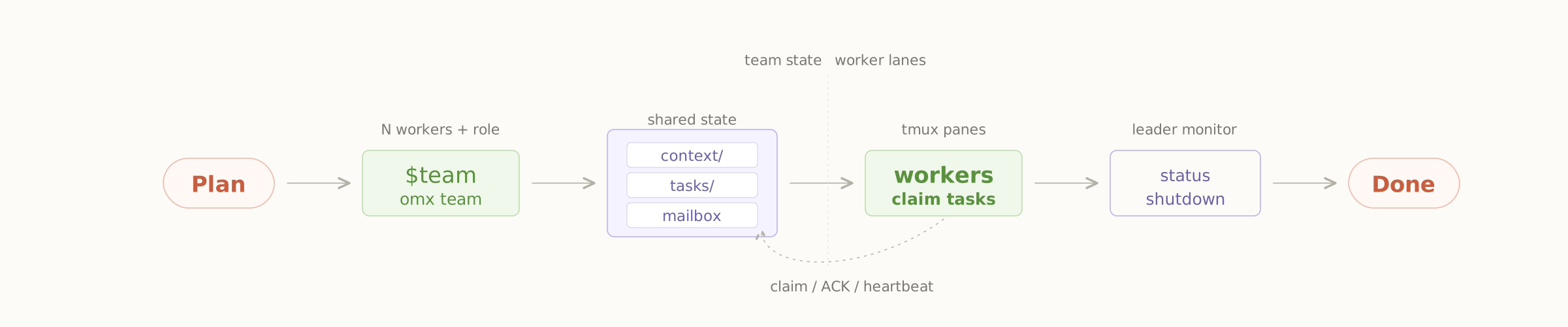
Good fit:
- frontend, backend, and tests can move independently
- file ownership can be assigned clearly
- the plan is already approved
Avoid team mode when the requirements are unclear, one context needs to stay intact, or parallel lanes would mostly create merge conflicts.
Verify and repair with $ultraqa
Use $ultraqa when correctness depends on behavior under hostile or edge conditions, not only on a green build. It combines baseline checks with adversarial dynamic e2e scenarios, diagnoses failures, applies fixes, cleans up temporary harnesses, and reports evidence.
$ultraqa --tests
$ultraqa --custom "the report export rejects stale state"
Good fit:
- CLI or workflow changes where prompt injection, cancel/resume, stale state, or misleading success output matters
- release-readiness checks that need failure evidence and cleanup proof
- features that passed unit tests but still need dynamic behavior probes